


You spend hours building UTM-tagged campaign links. You triple-check utm_source, utm_medium, and utm_campaign before every launch. Your naming conventions are airtight.
Then your visitor clicks the link, lands on your site, navigates to a second page, and every single one of those parameters vanishes from the URL.
Your attribution data just evaporated. And most people don’t even realize it’s happening.
- 1 The Problem Nobody Talks About
- 2 Why First-Party Cookies Are the Answer
- 3 The Cookie Consent Problem
- 4 The Browser Restriction Problem: Safari ITP
- 5 What Safari 26 Means for UTM Parameters
- 6 The Server-Side Solution
- 7 How GA4 Handles Attribution Natively
- 8 Implementation Options
- 9 Privacy and Compliance
- 10 What This All Means
The Problem Nobody Talks About
UTM parameters only exist in the URL of the landing page. The moment a user clicks to any other page on your site, those parameters are gone. This is how URLs work by design. Navigate away, and the query string doesn’t follow.
If your analytics tool grabs the UTMs on that first page load, great. But what happens when:
- A cookie consent banner blocks your analytics from firing on the landing page?
- The visitor browses five pages before converting, and your form needs to capture the original traffic source?
- Your CRM needs to know which campaign brought in a lead who didn’t convert until three days later?
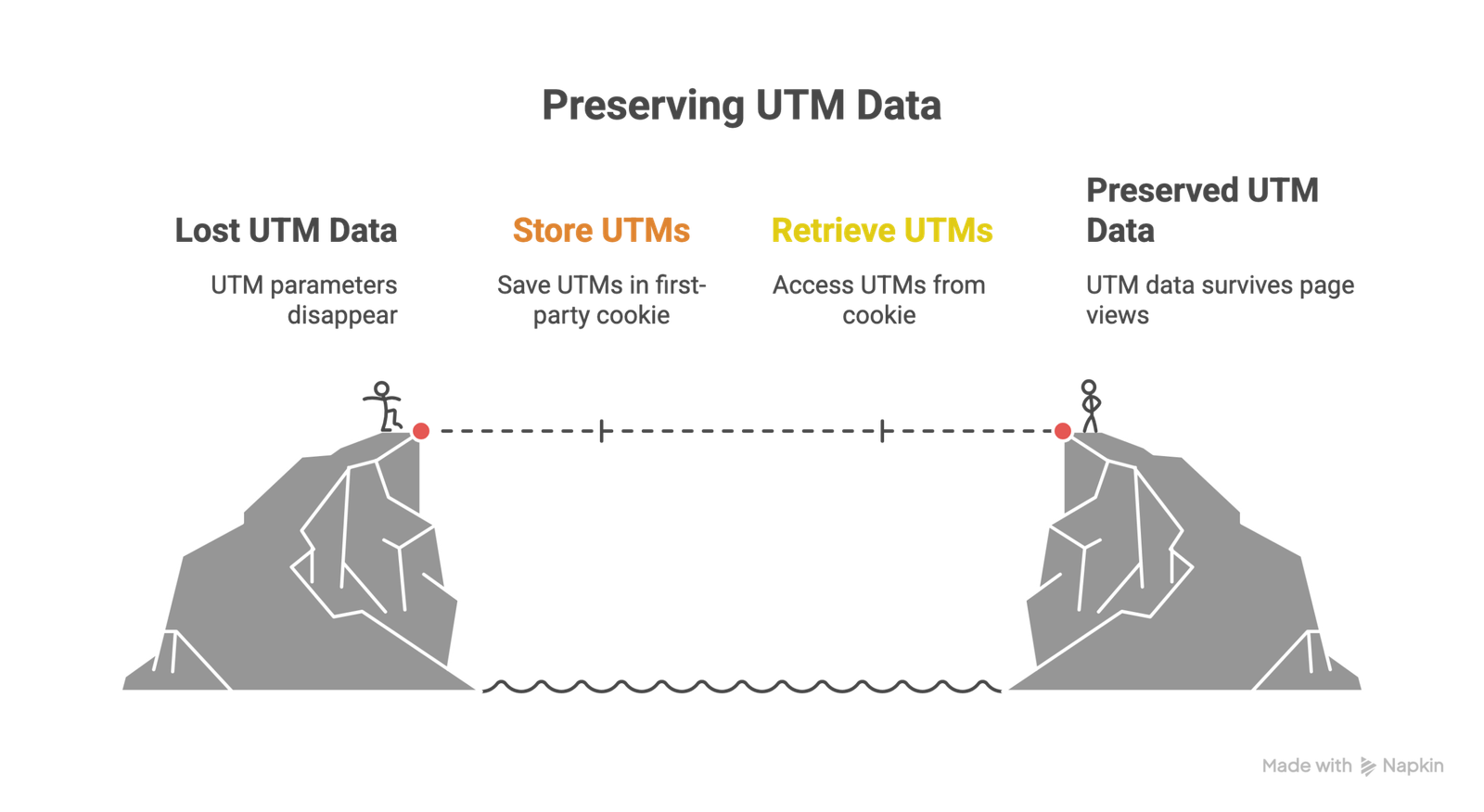
In all of these cases, the UTM data needs to survive beyond that initial page view. And the most reliable way to do that? Store it in a first-party cookie.
Why First-Party Cookies Are the Answer
A first-party cookie is set by your domain, for your domain. Unlike third-party cookies (set by external services like ad platforms), first-party cookies are widely accepted by all major browsers and carry fewer privacy restrictions.
Here’s the basic flow:
- The visitor arrives on your landing page with UTM parameters in the URL
- A script reads the UTM values from the URL query string
- The script writes those values to a first-party cookie on your domain
- As the visitor navigates your site (or returns days later), the cookie preserves the original attribution data
- When the visitor converts, you pull the UTM values from the cookie and pass them to your CRM, form, or analytics platform
This is the standard approach used across the industry. Google Analytics 4 does something similar natively: its _ga cookie stores a unique client ID that allows GA4 to tie sessions together and attribute conversions back to the original traffic source. The difference is that GA4 handles this internally. If you need UTM data in your CRM, hidden form fields, or any tool outside GA4, you need to store those values yourself.
The Cookie Consent Problem
Here’s a scenario that trips up a huge number of teams and rarely gets discussed.
A visitor clicks your UTM-tagged ad and lands on your site. Your cookie consent banner fires. The banner (if configured properly) is set analytics_storage to “denied” via Google Consent Mode. GA4 doesn’t fire. No cookies are set.
The visitor ignores the banner, clicks “About Us,” and lands on a second page. Now they click “Accept.”
By the time GA4 is allowed to run, it’s on the About Us page. The UTM parameters are long gone from the URL. That attribution data is lost permanently.
This is a real, documented problem. And it gets worse with stricter consent implementations under GDPR, where you legally can’t fire analytics tags until explicit consent is given.
Potential solutions to discuss with your legal team:
- Persist UTM parameters across pages (store them temporarily so they’re available when consent is granted).
- Design your consent banner to encourage a decision on the landing page rather than allowing users to browse past it.
- Use Google’s Advanced Consent Mode, which can send cookieless pings even before consent is granted (the data gets modeled, not directly attributed).
Each of these has legal nuances. The point is that the technical problem (UTMs disappearing on navigation) and the compliance problem (consent blocking analytics) compound each other, and most tracking setups don’t account for both.
The Browser Restriction Problem: Safari ITP
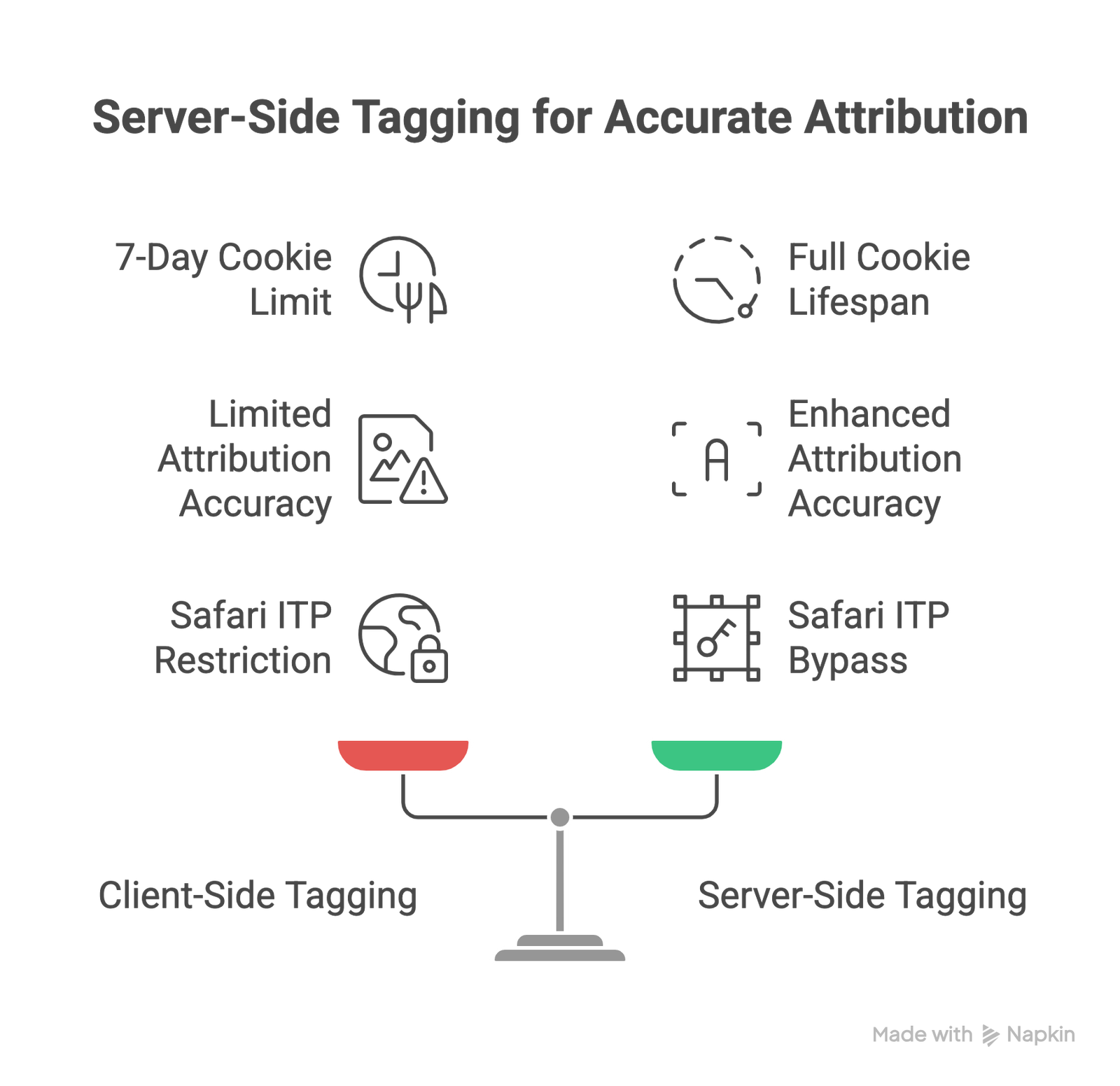
Even after you’ve stored UTM data in a first-party cookie, there’s another layer of complexity. Safari’s Intelligent Tracking Prevention (ITP) limits the lifespan of cookies set via JavaScript to seven days.
This means if a visitor arrives from your Google Ads campaign on Monday, you store the UTM data in a cookie, and they don’t come back until the following Tuesday (eight days later), Safari has already deleted that cookie. Your returning visitor looks like a brand-new user. The original campaign gets zero credit for the conversion.
This isn’t a fringe issue. Safari accounts for roughly 30% of browser traffic globally, and on mobile, it’s even higher. For businesses with sales cycles longer than a week (B2B, high-ticket e-commerce, real estate, financial services), this 7-day cap silently destroys attribution accuracy.
Here’s the timeline of how Safari’s restrictions have evolved:
- ITP 1.0 (2017): Targeted third-party cookies primarily
- ITP 2.1 (2018): Reduced the lifespan of all client-side first-party cookies (set via JavaScript) to 7 days
- ITP 2.2: Limited conversion attribution for known tracking domains to just 24 hours
- Safari 17 (2023): Caught CNAME cloaking workarounds (where trackers disguised themselves as your subdomain) and started treating those cookies with the same 7-day cap
- Safari 26 (September 2025): Introduced Advanced Fingerprinting Protection by default and expanded Link Tracking Protection
And it’s not just cookies. Local storage, session storage, and IndexedDB data in Safari all expire after 7 days of user inactivity. There is no client-side storage mechanism in Safari that avoids this restriction.
Firefox has similar (though less aggressive) protections through Enhanced Tracking Protection.
What Safari 26 Means for UTM Parameters (Good News)
After Apple’s WWDC 2025 announcements, the marketing industry panicked. Headlines suggested UTM parameters would be stripped from URLs in Safari.
Here’s what actually happened after testing on the final release:
UTM parameters are safe in standard browsing. Apple’s Link Tracking Protection targets user-identifiable click IDs (gclid from Google, fbclid from Meta, msclkid from Microsoft), not campaign-level parameters. WebKit explicitly clarified that campaign-style parameters like utm_source, utm_medium, and utm_campaign are allowed.
Click IDs get stripped in specific contexts. In Private Browsing mode, and when links are opened from Apple’s Mail or Messages apps, Safari removes parameters like gclid and fbclid before the page even loads. This breaks platform-specific conversion attribution in those scenarios.
Link Tracking Protection is NOT enabled by default in regular browsing (as of Safari 26). There was widespread confusion about this. The setting is under “Advanced Tracking and Fingerprinting Protection” (ATFP), but it defaults to on only in Private Browsing. Users can manually enable it for all browsing, but most won’t.
The key distinction: UTMs are aggregate campaign identifiers. Click IDs are user-level tracking identifiers. Apple is going after the latter, not the former.
That said, the direction is clear. Apple has been tightening restrictions with every release since 2017. Planning for UTMs to survive long-term is smart. Planning around click IDs surviving is risky.
The Server-Side Solution
Server-side tagging is the most robust method for preserving attribution data in first-party cookies because it changes how the cookie is set.
When you set a cookie via JavaScript in the browser (client-side), Safari caps it at 7 days. But when a cookie is set via an HTTP Set-Cookie response header from a server on your own domain, it’s treated differently. The cookie is recognized as genuinely first-party, which means it can persist for its full intended lifespan (months or even years).
Here’s how this works with Google Tag Manager’s server-side container:
- You map your server container to a subdomain of your site (like track.yourdomain.com)
- The browser sends tracking data to that subdomain
- Because the subdomain is part of your domain hierarchy, the response is first-party context
- The server container sets cookies via HTTP headers, not JavaScript
- Those cookies bypass ITP’s 7-day client-side restriction
This is why server-side tagging has become the go-to solution for teams serious about attribution accuracy. Cookies set this way can survive across sessions, giving you accurate returning-visitor identification and multi-touch attribution even on Safari.
But there’s a caveat: Safari also checks the IP address of your server against the IP of your main website. If they don’t match (which happens when your server container is hosted on a cloud provider with different IP ranges), Safari can still cap those cookies. The fix is routing your tracking endpoint through a CDN or proxy that shares IP infrastructure with your main site.
How GA4 Handles Attribution Natively
It’s worth understanding what GA4 already does so you’re not duplicating effort.
GA4 sets a _ga cookie (first-party, default 2-year expiration) that stores a unique client ID. When a user arrives with UTM parameters, GA4 reads those values from the URL, associates them with the client ID, and sends everything to Google’s servers. The UTM data doesn’t need to persist in the cookie itself because GA4 captures it on the first hit and processes it server-side.
This means for attribution within GA4 reports, the system works without you manually storing UTMs in cookies. GA4 even uses modeling to fill gaps when cookies are missing.
Where you DO need manual UTM cookie storage:
- Passing attribution data to your CRM (HubSpot, Salesforce, etc.)
- Populating hidden form fields with the original traffic source
- Feeding attribution data to tools outside the Google ecosystem
- Building custom multi-touch attribution models
- Connecting offline conversions back to digital campaigns
Implementation Options
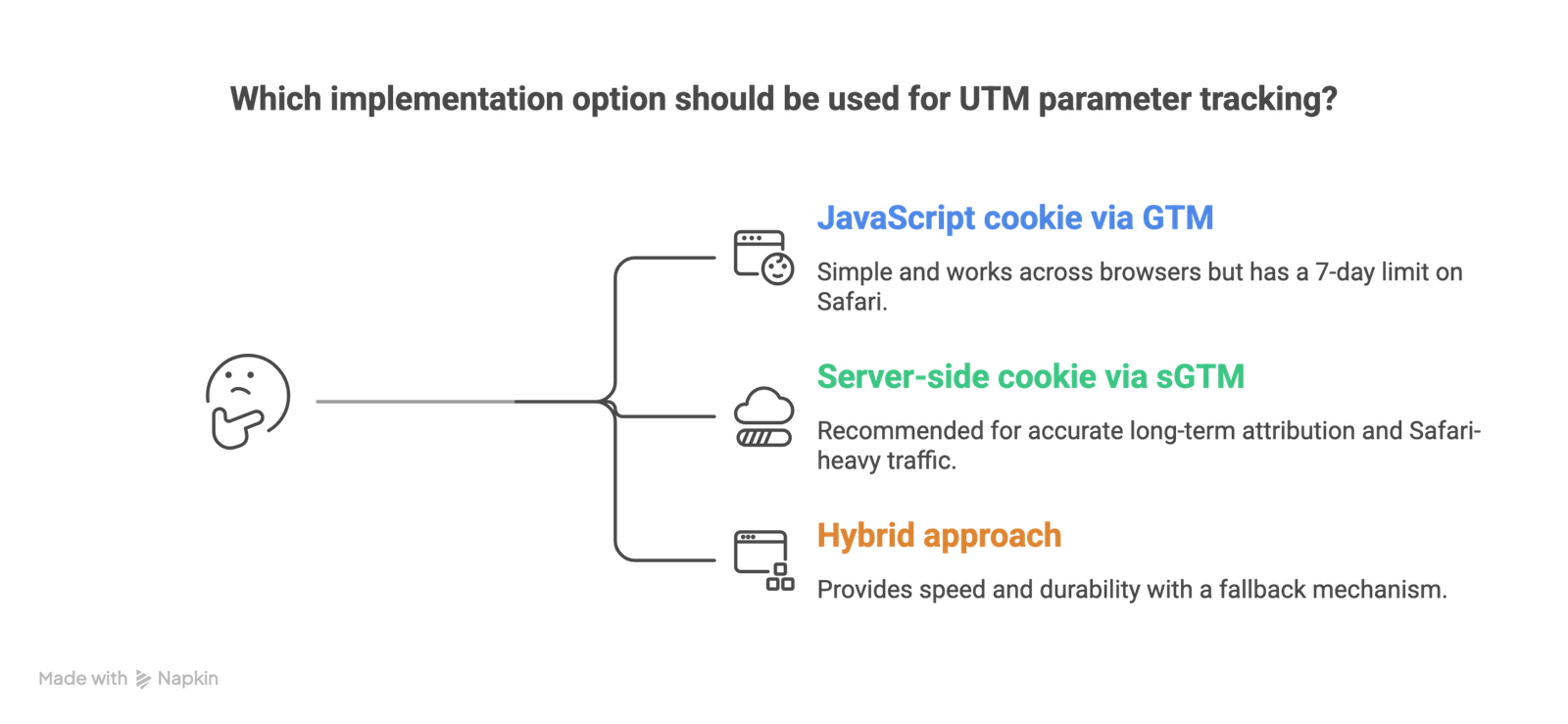
Option 1: JavaScript cookie via GTM (Basic)
Use a Custom HTML tag in Google Tag Manager that reads UTM parameters from the URL and writes them to a first-party cookie. Create a 1st Party Cookie variable to read them back when needed. This is the simplest approach and works across all browsers, but the cookie is capped at 7 days on Safari.
Best for: Quick wins, short sales cycles, non-Safari-heavy traffic
Option 2: Server-side cookie via sGTM (Recommended)
Set up a server-side GTM container on a custom subdomain. Use the container to set HTTP-only cookies that persist beyond ITP restrictions. Route your existing GA4, Meta CAPI, and Google Ads conversion data through the same container.
Best for: Accurate long-term attribution, B2B with long sales cycles, Safari-heavy audiences
Option 3: Hybrid approach
Store UTMs in a client-side cookie immediately on landing (for speed), then extend the cookie’s lifetime via a server-side response on subsequent page loads. This gives you coverage even if the server-side setup has issues, while still getting the durability benefit.
Best for: Teams in transition from client-side to server-side, or those wanting a fallback.
Privacy and Compliance
Storing UTM data in first-party cookies falls into a gray area between “functional” and “marketing” cookies under most privacy frameworks.
Under GDPR, you need a legitimate interest or explicit consent for marketing attribution cookies. UTM parameters themselves don’t contain personally identifiable information, but when combined with a client ID or session data, they become part of a user’s profile. Most consent management platforms categorize this under “Statistics” or “Marketing” permissions.
Under CCPA, UTM tracking data can qualify as “personal information” when it can be linked to a particular consumer. You should specify your UTM cookie usage in your privacy policy and provide opt-out mechanisms.
The safest approach: include UTM tracking in your cookie consent banner, categorize it appropriately, and only set the cookie after consent is granted (with a fallback strategy for the consent-timing problem described above).
What Does This All Means
Attribution data is only as good as your ability to preserve it across the user journey. UTM parameters are one of the most reliable and privacy-compliant tracking methods available, but their value drops to zero if they disappear after a single page view.
The combination of cookie consent requirements and browser restrictions means that basic client-side UTM storage is no longer enough for most businesses. Server-side cookie setting, proper consent timing, and an understanding of what browsers actually do to your cookies are now table stakes for accurate marketing measurement.
The good news: UTM parameters themselves are safe. Apple isn’t stripping them. Google isn’t deprecating them. They remain fully within your control, unlike platform-provided click IDs that can change or get blocked without notice.
The teams that get this right will have a measurable advantage in understanding which campaigns actually drive revenue. The teams that don’t will keep wondering why their GA4 numbers never match their CRM.
Related Posts

What Data Can You Legally Send When Consent Is Denied?
What data can you send when consent is denied? Full breakdown of cookieless…

First-Party vs Third-Party Cookies: Understanding the Difference
Learn the real difference between first-party vs third-party cookies, how they…

A Complete Guide to Offline Conversion Tracking
Learn how offline conversion tracking works, how to set it up in Google Ads and…