


Client-Side vs Server-Side Tracking
Your tracking architecture is an attack vector. Not for hackers. For data loss.
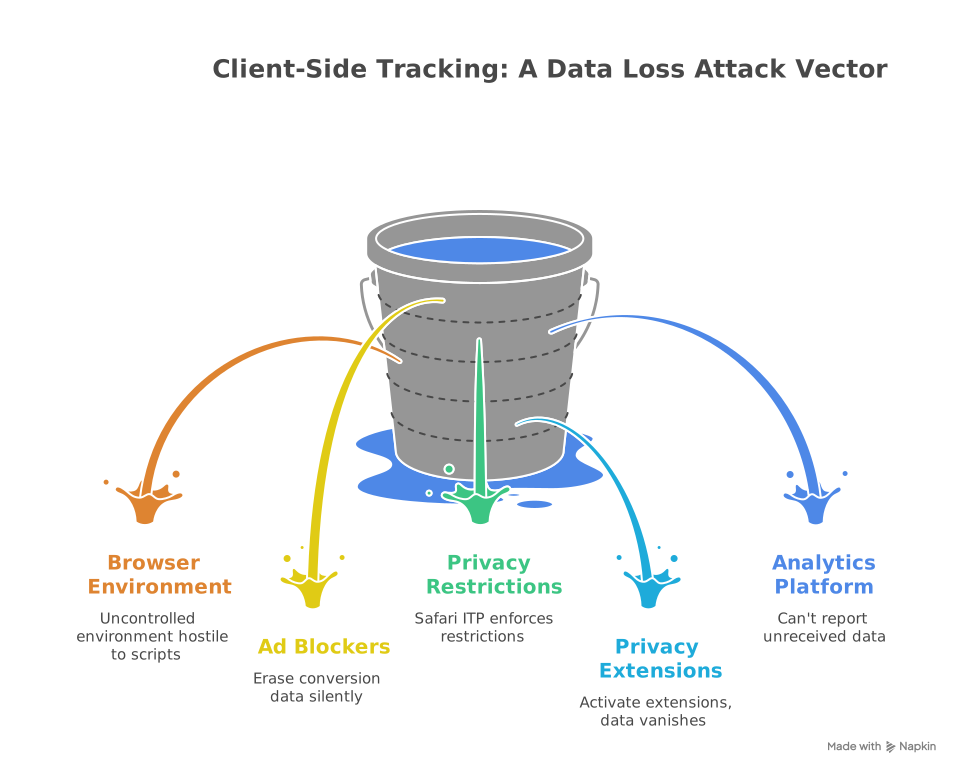
Every ad blocker installed, every Safari ITP restriction enforced, every privacy browser extension activated quietly erodes your conversion data. And you don’t see it happening because your analytics platform can’t report what it never received.
This is the core problem with client-side tracking. It operates in an environment you don’t control, the user’s browser, and that environment is becoming increasingly hostile to third-party scripts. The result? Up to 30% of your conversion events vanish before they reach Google Analytics or Meta. That’s not a rounding error. For a DTC brand spending six figures on paid media, that’s misattributed revenue measured in the hundreds of thousands.
Server-side tracking exists to solve this. But it’s not a simple swap. Each method has distinct technical mechanics, privacy implications, and implementation costs. Understanding where each one works, where it fails, and when to combine them is the difference between clean data and contaminated attribution.
Where Does the Data Actually Live?
The fundamental difference between client-side and server-side tracking is the origin of the data request.
Client-side tracking runs JavaScript directly in the user’s browser. When someone clicks “Add to Cart,” a script fires, packages up event data (page URL, product ID, session info, UTM parameters), and sends HTTP requests directly to every analytics endpoint you’ve configured. Google Analytics gets one request. Meta gets another. TikTok gets a third. Each vendor’s script runs independently inside the browser.
Think of it as a camera in the user’s environment. It captures everything happening in that space, mouse movements, scroll depth, and DOM interactions. Rich context. But no security perimeter around the data.
Server-side tracking moves the data collection point to your backend infrastructure. The browser sends a single request to your server (or server-side container, like a GTM server container). Your server then processes, validates, enriches, and distributes that data to each analytics platform via API.
Think of it as a security checkpoint. Every event passes through your environment first. You control what gets forwarded, what gets scrubbed, and which platforms receive what data. The browser never talks directly to third parties.
That architectural difference cascades into every other consideration: reliability, privacy, performance, and cost.
Reliability: Where Your Data Disappears
This is where the gap becomes expensive.
Client-side tracking is susceptible to multiple failure points that you can’t control. Ad blockers intercept tracking scripts before they execute. Privacy-focused browsers like Safari impose Intelligent Tracking Prevention (ITP), limiting cookie lifespans and restricting cross-site tracking. Browser extensions strip out tracking pixels. Network interruptions during page unloads kill in-flight requests.
The data loss isn’t theoretical. Research consistently shows ad blockers affect 25 to 30% of web traffic in certain industries. One documented case from a fintech company showed client-side tracking reporting 1,000 monthly signups while server-side payment logs recorded 1,400 actual customers. That 400-user gap represented nearly $200,000 in misattributed revenue.
Server-side tracking is largely immune to these disruptions. The data transmission happens between your server and the analytics platform’s API. No browser scripts to block. No cookies to expire prematurely. No interference from extensions or privacy settings.
For revenue events, purchase confirmations, subscription activations, and any conversion that feeds your bidding algorithms, server-side is the source of truth.
Data Context: What Each Method Can See
Server-side wins on reliability. Client-side wins on context.
The browser has direct, native access to rich user-level data. Cookies, IP addresses, User Agents, screen resolution, UTM parameters, scroll depth, click coordinates, and form interaction timing. This is the raw material for behavioral analysis, heatmaps, session recordings, and real-time personalization engines.
The server sees only what’s contained in the HTTP request: headers and request body. It doesn’t know what the user’s mouse is doing. It can’t see scroll depth or DOM state. To capture UTM parameters or referral data on the server, you need client-side logic that parses those values first and passes them through.
This isn’t a flaw. It’s an architectural constraint. And it’s why the two methods are complementary, not competing.
The practical pattern looks like this: use client-side tracking for behavioral insights (product browsing, UI interactions, scroll engagement) and server-side tracking for business-critical events (purchases, signups, revenue, lead submissions). This hybrid model captures the full customer journey while protecting the data that feeds your ad platforms.
Privacy and Data Control: The Compliance Differentiator
This is where server-side tracking earns its keep for any brand operating under GDPR, CCPA, or any emerging privacy regulation.
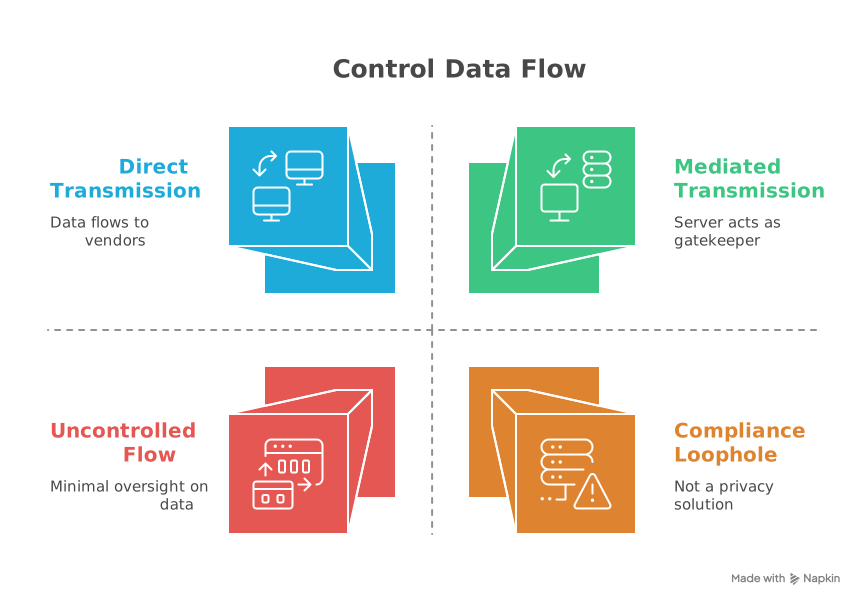
With client-side tracking, data flows directly from the user’s browser to third-party vendors. Once a script fires, you have minimal control over what information gets transmitted. Google, Meta, TikTok, whoever’s pixel is running, they receive whatever data their script collects. IP addresses, browser fingerprints, cross-site identifiers, all of it leaves your domain.
Server-side tracking introduces a mediation layer. Your server acts as a gatekeeper. Before any data reaches a third-party platform, you can:
- Scrub PII. Remove or hash personally identifiable information (IP addresses, email addresses, user IDs) before forwarding events to analytics vendors.
- Enforce data minimization. Send only the fields each platform actually needs. A purchase event for GA4 doesn’t need the same payload as a Meta CAPI event. Your server decides what goes where.
- Enforce consent. Implement server-side consent logic that blocks or filters data transmission based on the user’s consent state. This serves as a critical backup. If a client-side consent mechanism fails, gets bypassed, or loads asynchronously, your server-side rules still hold.
- Control data residency. Route data processing through servers in specific geographic regions. EU user data processed on EU servers before any information reaches US-based vendors. This matters for GDPR territorial compliance.
- Protect API credentials. Measurement IDs, API keys, and client secrets live on the server, never exposed in the browser’s source code. With client-side tracking, anyone can inspect your site and extract your GA4 Measurement ID. With server-side, that ID never touches the client.
One important caveat: server-side tracking is not a privacy loophole. Every regulation still applies to the data you collect. The advantage is architectural. You have the technical capability to comply in ways that client-side tracking simply can’t support.
Performance: What Your Users Actually Feel
Every third-party script running in the browser competes for resources. JavaScript execution, network requests, and DOM manipulation all of it happens on the user’s device. Stack five or six vendor tags (GA4, Meta Pixel, TikTok Pixel, Pinterest Tag, Hotjar, your CDP), and you’re forcing the browser to manage multiple simultaneous outbound connections while trying to render your page.
The result is slower page loads and degraded Core Web Vitals. For DTC brands, that directly impacts conversion rates. A one-second delay in page load can mean measurable revenue loss.
Server-side tracking shifts that processing burden off the client. The browser sends one request to your server container. Your server fans that single event out to every platform via API. Fewer scripts in the browser, fewer HTTP requests from the client, faster page rendering.
One documented case showed a media company reducing their tracking scripts from 15 to 3 by moving non-critical events server-side. The result was a 200ms improvement in page load time, a meaningful gain for SEO and user experience.
The trade-off is real but manageable: your server infrastructure absorbs additional processing load. In practice, the overhead from tracking events is negligible compared to your existing web traffic. The cost is in development time, not hardware.
Implementation: What It Actually Takes
Client-side tracking is easier to deploy. Paste a script tag, configure a few triggers in GTM, and you’re collecting data within hours. Low technical barrier. Low upfront cost. This is why most brands start here.
Server-side tracking requires backend integration. You need a server-side container (Google Tag Manager’s server-side container is the most common), cloud infrastructure to host it (Google Cloud Platform, AWS, or similar), and engineering resources to configure the data flow. You’re building and maintaining a data pipeline.
The development investment is the primary cost. Setting up event routing, replicating client-side context (UTM parameters, User Agents, session data), and ensuring each vendor integration works correctly takes real engineering hours.
But here’s the counterweight: client-side tracking has hidden maintenance costs. Debugging data discrepancies caused by ad blockers is frustrating and time-consuming. Managing script performance to protect Core Web Vitals requires ongoing attention. Troubleshooting conversion gaps between your platform dashboards and your actual revenue is the kind of operational drag that silently eats team bandwidth.
The Hybrid Architecture: How It Works in Practice
The most effective tracking implementations aren’t either/or. They’re both.
The pattern that works for DTC brands:
- Client-side handles product browsing events, page views, scroll engagement, UI interactions, heat mapping, session recording triggers, and any event where behavioral context is the primary value.
- Server-side handles purchases, revenue events, subscription activations, lead form submissions, payment confirmations, and any event that feeds your ad platform bidding algorithms or financial reporting.
- The bridge between them is a lightweight client-side data layer that captures session-level context (UTM parameters, client ID, consent state, referral source) and passes it to the server with each event. The server enriches the event with CRM data or backend attributes, validates it, applies consent rules, and routes it to the appropriate platforms. This architecture gives you the behavioral richness of client-side tracking with the reliability, privacy control, and accuracy of server-side. It’s consent-aware by design. And it eliminates the blind spots that cost DTC brands real money on misattributed ad spend.
Client-Side vs Server-Side Tracking
Click any row to expand details. Toggle the view to compare side by side or focus on one.
Frequently Asked Questions
Everything you need to know about server-side infrastructure, hosting, and rendering.
SSR vs CSR
Server-Side Rendering vs Client-Side Rendering
Click scores to highlight • Hover rows for details
The verdict? Use both. SSR for initial load and SEO, CSR for interactivity after hydration.
Related Posts

Why Hire a Conversion Tracking Agency?
Hiring a conversion tracking agency means accurate data, better campaign…


What Data Can You Legally Send When Consent Is Denied?
What data can you send when consent is denied? Full breakdown of cookieless…