


Introduction: Why Server-Side Tracking is a Must for HubSpot Users
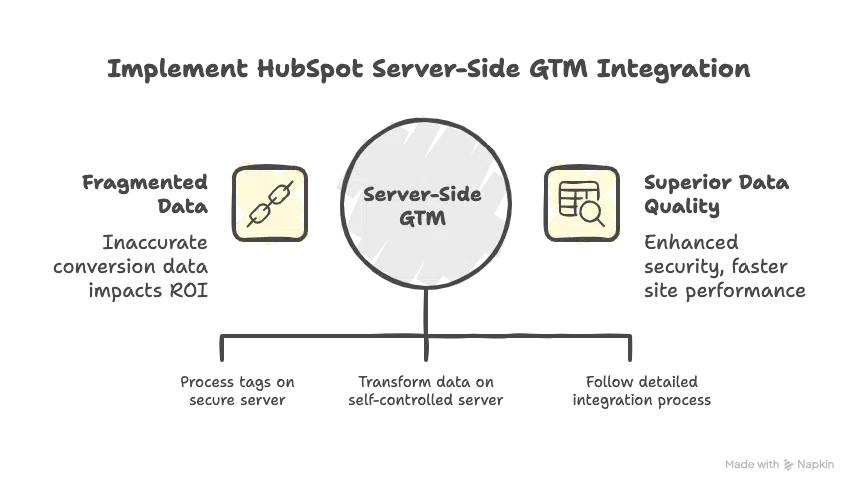
The HubSpot Server-Side GTM Integration is no longer optional—it is a mandatory step for maintaining data integrity in modern marketing stacks. Implementing this solution is crucial for any organization that relies on accurate data. As the leading platform for inbound sales and marketing, HubSpot relies on consistently precise conversion data to power lead scoring, personalize automation workflows, and ultimately prove return on investment (ROI). If your data is fragmented, your entire marketing machine fails to perform.
The legacy approach of relying solely on client-side Google Tag Manager (GTM) is fundamentally flawed in the current privacy environment. Ad blockers, strict browser limitations like Apple’s Intelligent Tracking Prevention (ITP), and the systemic deprecation of third-party cookies are causing massive data drift and underreporting. This loss directly impacts the quality of leads and reporting within your HubSpot portal.
The solution is the Server-Side GTM (sGTM) architecture. By processing tags and data transformations on a secure, self-controlled server, this architecture guarantees superior data quality, enhanced security, and faster site performance. This comprehensive guide provides the technical rationale and the detailed, step-by-step process required to successfully execute the HubSpot Server-Side GTM Integration, future-proofing your data collection strategy.
Understanding the Critical Role of Server-Side Conversion Tracking
Conversion tracking is the lifeblood and financial compass of your digital strategy. It monitors key actions—purchases, form submissions, and critical lead generations—that directly signal campaign success. Accurately attributing these successes is paramount for optimizing ad spend across channels like Google Ads and Facebook, and for ensuring your HubSpot contacts are properly segmented and nurtured.
The financial and strategic consequences of inaccurate conversion tracking are enormous. Misallocated ad budgets, wasted optimization efforts based on flawed A/B tests, and—most significantly for HubSpot users—erroneous lead scoring and automation decisions directly erode your sales pipeline efficiency. When conversion data is missed or delayed, your ability to trigger timely follow-up sequences is compromised.
The HubSpot Server-Side GTM Integration eliminates these issues by creating a robust, secure, first-party data pipeline. For HubSpot users, this means that essential metrics are reliably tracked, even when client-side scripts are blocked. This architectural shift ensures data is collected, validated, and sent via a reliable method that is resilient to external interference, guaranteeing the high-fidelity data HubSpot needs to maximize your return on investment (ROI) truly. For a deeper dive into the underlying technology, you can refer to this resource: Server-Side Tagging Explained.
Prerequisites for a Successful Server-Side GTM Setup
To seamlessly implement the HubSpot Server-Side GTM Integration, you must first secure several foundational elements. Failure to prepare these items will halt the integration process.
- Active Administrative Accounts: You must possess full administrative-level access to both your HubSpot account and your Google Tag Manager account. Access to the HubSpot API settings and the ability to provision new GTM containers are non-negotiable.
- Technical Fluency: A strong understanding of core web technologies is required, including JavaScript, HTML, the Data Layer, and the technical distinction between client-side and server-side tracking. Familiarity with cloud hosting environments will also significantly expedite deployment and long-term maintenance.
- Custom Domain Access: You must own a domain and have access to its DNS settings to create the necessary CNAME record for your server container. This step is mandatory for achieving the resilient first-party data collection context.
- Current Tag Audit: Conduct a thorough review of all existing tags and triggers in your current client-side GTM setup. Identifying and resolving any potential dependencies or conflicts before migration ensures a smooth data transition and prevents tracking discrepancies or data duplication.

Step-by-Step Guide to Setting Up the GTM Server Container
Effectively setting up your sGTM container is the first technical step in building your accurate conversion pipeline for the HubSpot Server-Side GTM Integration.
1. Create the Server Container
- Navigate to your Google Tag Manager workspace.
- Select the option to create a new container.
- Name it descriptively and clearly (e.g., “Server-Side GTM – [Your Domain]“) and select the “Server” container type.
- GTM will provide a unique container ID. At this stage, you will be prompted to set up your tagging server. While you can opt for automatic provisioning, choosing the “Manually provision tagging server” offers greater flexibility, especially if you have existing cloud infrastructure you wish to leverage.
2. Configure Your Custom Domain and DNS
This is the most critical step for achieving a first-party context, which is fundamental to the HubSpot Server-Side GTM Integration.
- Create a Subdomain: Define and set up a subdomain (e.g.,
gtm.yourdomain.com) through your domain registrar’s control panel. - Establish First-Party Context: You must then create a CNAME record that points this new subdomain to the GTM server URL provided during setup. By using your own custom domain for tagging, you establish a first-party data context that makes your cookies and tracking requests far more resilient to browser and ad-blocker limitations than generic, third-party domains.
3. Deploy the Server Environment via Google Cloud (Manual)
The traditional method requires deploying and scaling the actual server environment. This is typically done using Google Cloud Platform (GCP) or Amazon Web Services (AWS). You will provision a new cloud instance (Compute Engine in GCP) and install the GTM server container using the scripts provided by Google. Ensure your instance is configured for sufficient horizontal scaling to handle peak traffic load, as under-provisioning can lead to dropped requests and conversion loss. You can find detailed technical requirements and official deployment documentation here: Official Google Cloud Deployment Guide. The recommended initial setup includes at least three server instances for redundancy.
4. Utilizing Third-Party Hosting Platforms (Stape/TAGGRS)
For users who want to avoid manual cloud configuration, providers like Stape and TAGGRS offer highly simplified, managed hosting solutions for your sGTM container.
- Simplified Provisioning: Instead of managing GCP or AWS directly, you sign up with the third-party service and paste your GTM container ID.
- Instant Deployment: The provider automatically provisions the necessary cloud infrastructure, manages scaling, and handles security updates and maintenance on your behalf. This significantly reduces setup time and removes the need for deep cloud administration expertise.
- Branded Tagging URL: The provider instantly gives you the unique, branded tagging URL that you need to configure your CNAME record, fulfilling the critical first-party context requirement immediately.
- Cost Structure: This approach often shifts the cost from variable cloud usage fees to a fixed monthly fee based on the volume of events processed, making budget forecasting simpler.
Configuring HubSpot for Server-Side Data Capture
To fully leverage the power of your high-quality sGTM data, you must prepare HubSpot to receive and process it effectively.
1. Define and Create Tracking Events in HubSpot
- Use the HubSpot Events tool within your portal to clearly define the specific user interactions you intend to measure (e.g., a specific form fill, a content download, or a video completion event).
- Naming Convention is Key: The names of these defined events must exactly match the event names you will configure in your GTM server-side tag. This consistent naming convention is non-negotiable for a functional HubSpot Server-Side GTM Integration.
2. Set Up Conversion Goals
- Within HubSpot’s reporting and analytics tools, establish clear Conversion Goals that align directly with your key performance indicators (KPIs), such as Sales Qualified Leads (SQLs) or Marketing Qualified Leads (MQLs). These goals provide the processing framework for HubSpot to correctly categorize and attribute the accurate data it receives from GTM.
3. Integrate via the HubSpot API
The technical core of the HubSpot Server-Side GTM Integration hinges on configuring the HubSpot API to facilitate a direct, server-to-server data exchange.
By programming your server container (via the correct GTM tag template) to send data directly to the HubSpot API endpoint, you eliminate reliance on unreliable client-side scripts. This architecture guarantees superior data accuracy and, crucially, grants you granular control over data governance. You can filter and scrub sensitive Personally Identifiable Information (PII) like raw IP addresses before it ever leaves your server, which is vital for maintaining GDPR and CCPA compliance. For API specifics and authentication details, consult: Official HubSpot API Docs.
Creating Tags and Triggers in Server-Side GTM
Accurate conversion tracking requires correctly configured Tags and Triggers within your dedicated sGTM container to enable the HubSpot Server-Side GTM Integration.
1. Build the HubSpot Tracking Tag
- In your Server-Side GTM interface, navigate to “Tags” and click “New Tag.”
- Select the appropriate tag template. For HubSpot, this is often a custom HTTP Request tag or a dedicated community template designed for HubSpot API calls.
- Configure the tag settings. This involves mapping data points from the incoming server request to the necessary parameters required by the HubSpot API. You must define the event name, the required HubSpot event type, conversion value, and unique identifiers (like a user’s email hash or a cookie ID) to ensure accurate data capture and correct contact association within HubSpot’s database.
2. Define Precise Triggers
- In your sGTM container, triggers are based on incoming client events that have already been collected from your website (often via a client-side Google Analytics 4 (GA4) event, which acts as the initial data collector).
- You must condition your trigger to fire the HubSpot tag only when that specific incoming event occurs and meets any necessary value or condition thresholds. This precise setup ensures the data passed from the server is clean, targeted, and highly relevant, preventing unnecessary data transmission and cost overruns associated with cloud usage.
Testing and Troubleshooting Your Integration
Rigorous testing is non-negotiable for guaranteeing data integrity and confirming your HubSpot Server-Side GTM Integration is flawless before pushing live.
- GTM Preview Mode: Utilize the GTM Preview mode to observe the data flow in real-time. Verify that incoming client events are correctly triggering your Server-Side HubSpot tags and that the payload (the complete data packet being sent) is accurate and contains the necessary HubSpot-required fields.
- Validate Tag Firing: Use the built-in debugging tools to confirm the HubSpot tags fire only when the expected user action (e.g., successful form submission) is performed. Pay close attention to the HTTP status code of the request leaving the server—it must be
200(success). Errors like400or500indicate a critical failure in the API request or server logic. - HubSpot Data Reconciliation: The final, essential check is to review the Analytics and Reports section directly in HubSpot. Compare the number of events captured in HubSpot with the number of successful tag fires observed in GTM’s debug log. The numbers must align to confirm the integration is reliable and effective. If discrepancies exist, check your HubSpot data filters or your server’s firewalls.
Common Issues and Advanced Troubleshooting
When deploying the HubSpot Server-Side GTM Integration, keep these common issues in mind:
- Mismatched Event Names: If a HubSpot event name does not precisely match the event name sent by the sGTM server, the data is silently dropped. Check for leading/trailing spaces or capitalization errors.
- Missing User Identifiers (De-anonymization): HubSpot requires a way to associate the event with a known contact (usually email or a specific cookie ID). If the server-side tag doesn’t correctly pass these identifiers, the event may be recorded but not tied to a specific user, making it useless for lead scoring.
- API Authentication Errors (401/403): If your server-side tag is making an API call, ensure the API key or private app token is correctly stored as a GTM variable linked to a secure environment secret and that it has the correct scope of access.
- Cloud Latency and Scaling: For extremely high-traffic sites, check your cloud resource scaling limits. Under-provisioned servers can drop requests, leading to conversion loss during peak traffic times.

Conclusion and Server-Side GTM Best Practices
The shift to a HubSpot Server-Side GTM Integration isn’t a technological upgrade—it’s a crucial investment in data governance and business continuity. It creates a secure, fast, and future-proof foundation for all your HubSpot-driven marketing efforts.
To maintain a robust integration and maximize your long-term performance, follow these key best practices:
- Continuous Monitoring: Do not rely on “set it and forget it.” Establish automated alerts and regularly audit the system’s performance, using GTM debugging tools and comparing data consistency against HubSpot reports to proactively address potential data discrepancies.
- Maintain Structure and Documentation: Ensure your sGTM setup, including all data layer schemas and variable mappings, is logically structured and thoroughly documented. This is critical for onboarding new team members and expediting compliance audits.
- Prioritize First-Party Cookies: Always configure your server environment to utilize your own custom domain for tagging, ensuring the use of durable first-party cookies that are resilient to browser limitations, thereby future-proofing your data stream against external pressures.
Follow these steps diligently, and you will be able to confidently rely on the powerful insights driven by your high-fidelity HubSpot conversion data, enabling smarter, more effective marketing decisions.
Related Posts


Top 5 Tracking Mistakes That Are Wasting Your Ad Budget
Maximize your ad budget! Avoid these 5 critical tracking mistakes and gain…