

“We moved to server-side tracking.”
No, you didn’t. You set up server-side tagging. And that distinction matters more than most people realize.
These two terms get swapped constantly in marketing conversations, LinkedIn posts, Slack threads, and vendor sales pitches. It’s not a harmless mix-up. Confusing the two leads to bad architecture decisions, false confidence in your data pipeline, and compliance gaps you don’t even know exist.
Let’s clear it up…
What Is Server-Side Tagging?
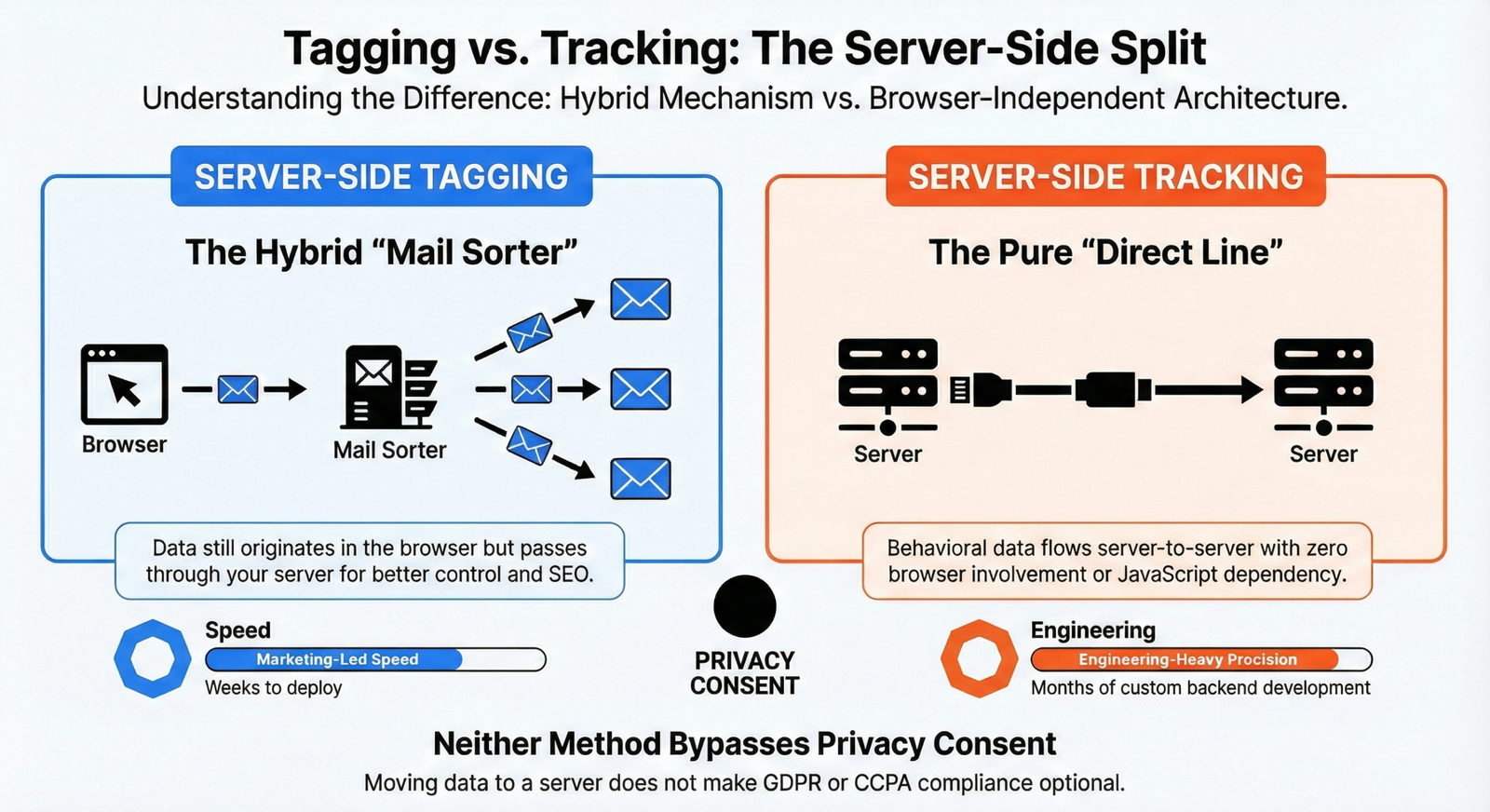
Server-side tagging is a tag execution method. Instead of firing your tracking tags (Google Analytics, Meta Pixel, Google Ads, etc.) directly in the user’s browser, you route them through a server you control.
The most common example? Google Tag Manager’s server-side container (sGTM). Here’s how it works:
- A user visits your site
- A lightweight script (like gtag.js) fires in the browser and sends an event to your cloud endpoint
- Your server container receives that data
- The server processes, validates, and routes the data to its final destinations (GA4, Meta CAPI, Google Ads, etc.)
The browser is still involved. Data still originates from the client. You’re adding an intermediary layer that gives you more control over what gets forwarded, to whom, and in what format.
Think of it like a mail sorting facility. Letters still come from people’s houses (the browser), but instead of going directly to each recipient, they pass through a central hub where you can inspect, filter, and redirect them.
Learn more: Google Tag Gateway
Why Marketers Love It
Server-side tagging solves real problems that have been getting worse every year. Ad blockers now prevent up to 40% of data collection on some sites. Safari’s Intelligent Tracking Prevention (ITP) limits cookie lifespans to as little as 7 days. Third-party scripts bloat page load times and tank your Core Web Vitals.
By routing data through a first-party subdomain (like ‘data.yoursite.com’), server-side tagging can extend cookie lifespans, bypass certain ad blocker restrictions, and reduce the JavaScript weight on your pages. That last one directly impacts your SEO, since Google uses Core Web Vitals as a ranking signal.
What It Doesn’t Do
Here’s where the confusion gets expensive. Server-side tagging does not eliminate browser dependency. If a user’s browser blocks the initial gtag.js script from firing, no data reaches your server container either. You’ve improved control and data quality, but you haven’t removed the vulnerability entirely.
It also doesn’t make consent optional. More on that below.
What Is Server-Side Tracking?
Server-side tracking is the broader concept. It’s a data collection approach where behavioral data is collected and processed entirely on the server, with no browser-side tags firing at all.
We’re talking about server-to-server communication. Backend event logging. CRM-triggered conversions. Warehouse-native activation. The browser doesn’t need to be involved in the data transmission chain.
Learn more: CRM-triggered conversions
Examples include:
- Your backend logs a purchase event and sends it directly to Meta’s Conversions API via a server-to-server call
- Your CRM detects a lead status change and fires a conversion event to Google Ads through the API
- Your data warehouse sends audience segments to advertising platforms for activation
- Your payment processor triggers a conversion event that flows to your analytics stack without touching the browser
This approach removes the browser from the equation entirely. No JavaScript. No cookies. No dependency on what happens in the client environment.
Why It’s Harder to Implement
The reason everyone isn’t doing pure server-side tracking is simple: it’s significantly more complex. It requires deep involvement from your engineering team, tight integration between your backend systems and marketing platforms, and custom data mapping for every destination.
With server-side tagging, a marketing team can set up sGTM, configure some tags, and be running in a few weeks. Pure server-side tracking often requires months of development work, ongoing maintenance, and IT resources that most marketing teams don’t have direct access to.
That’s the tradeoff. More control and accuracy, but substantially more effort.
The Simple Way to Remember It
Server-side tagging = the how (the mechanism for executing and routing your tags)
Server-side tracking = the what (the broader approach to collecting behavioral data)
Server-side tagging is one method within server-side tracking. Every sGTM setup involves server-side tagging. Not every server-side tracking implementation involves a tag manager at all.
Server-Side Tagging vs. Server-Side Tracking
Click any row or card to highlight. Toggle between views.
| Category | Server-Side Tagging | Server-Side Tracking |
|---|---|---|
| What It Is | A tag execution method that routes marketing tags through a server you controlHybrid Approach | A data collection approach where behavioral data is collected and processed entirely on the serverFull Server-Side |
| Browser Dependency | Still requires a client-side script (e.g., gtag.js) to initiate the data stream | No browser involvement. Data flows server-to-server without any client-side scripts |
| Common Example | Google Tag Manager server-side container (sGTM) with GA4 + Meta CAPI tags | Backend purchase events sent directly to Meta Conversions API or CRM-triggered Google Ads conversions |
| Implementation | Marketing teams can set up and manage with moderate technical skill. Weeks to deploy. | Requires backend engineering, custom integrations, and ongoing IT support. Months to deploy. |
| Ad Blocker Impact | Reduced impact via first-party subdomain routing, but initial script can still be blocked | No impact. No client-side scripts exist for ad blockers to intercept |
| Cookie Handling | Can extend first-party cookie lifespans via server-set cookies (with IP matching caveats) | Cookies are optional or irrelevant. Data collection doesn't depend on them |
| Data Accuracy | Better than client-side, but still subject to browser-level data loss | Highest accuracy. No client-side variables affecting data completeness |
| Page Speed Impact | Reduces client-side JavaScript load, improving Core Web Vitals and SEO performance | Zero client-side footprint. Maximum performance benefit |
| Consent Required? | Yes. Consent must flow from CMP through the server container to each tag | Yes. Processing personal data on a server still requires valid user consent |
| Best For | Marketing teams wanting better data quality and control without heavy engineering lift | Businesses with critical conversion data that cannot tolerate browser-level data loss |
← Swipe to see full table →
Server-side tracking = the what (data collection approach).
Most mature setups use both. sGTM handles marketing tag routing while server-to-server integrations handle critical conversion events.
Why This Distinction Is So Important
- Architecture Decisions
If you think setting up sGTM means you’ve achieved “server-side tracking,” you might skip building the backend event infrastructure you need. sGTM is a great first step, but it’s not the finish line.
For example, if you’re running an e-commerce store and your only server-side implementation is sGTM, you’re still dependent on the browser to initiate every data point. If a customer completes a purchase but the confirmation page doesn’t load properly (or gets blocked), you lose that conversion data. A true server-side tracking setup would log the purchase event from your payment processing backend, regardless of what happens in the browser.
- Data Accuracy
sGTM improves data quality compared to pure client-side tagging. But it’s still a hybrid approach. Ad blockers can still interfere with the initial client-side script. ITP restrictions still limit cookie lifespans (and Apple’s updates can limit server-set cookies too, if your IP addresses don’t match).
Pure server-side tracking eliminates these browser-level vulnerabilities. When your server talks directly to another server, there’s nothing for an ad blocker to intercept.
- Compliance Gaps
This is where people get burned the most. Moving tags to a server doesn’t make consent optional. Under the GDPR, CCPA, and virtually every other privacy regulation, you need user consent before collecting and processing personal data, regardless of where the processing happens.
what you can legally collect when consent is denied
Google’s own Consent Mode v2 framework requires consent signals to flow from the browser through your server container. Server-side GTM doesn’t even have a built-in consent mode yet, meaning you need to configure consent checks manually using tools like Google’s consent state parameters (GCS) or custom CMP integrations.
Understanding your architecture is how you implement consent signals correctly at every layer, not just the cookie banner on your homepage.
Learn more: marketing attribution
What Changed in the Privacy Landscape
If you’re reading this in 2026, the landscape looks very different from what it did even a year ago.
Google officially ended its Privacy Sandbox initiative in October 2025 after six years of development. The ambitious plan to replace third-party cookies with browser-level alternatives like Topics API and Protected Audience collapsed due to low adoption, regulatory pressure from the UK’s Competition and Markets Authority, and pushback from both advertisers and publishers.
Third-party cookies will remain in Chrome indefinitely. But that doesn’t mean the privacy direction has reversed. Safari and Firefox continue to aggressively restrict third-party tracking. The GDPR, CCPA, and a growing list of global privacy regulations still require informed, granular consent. And users themselves are increasingly blocking tracking through browser extensions and privacy-focused settings.
The practical result? Server-side approaches aren’t a nice-to-have. They’re how you maintain data quality and compliance in an environment where browser-level tracking keeps getting harder.
When to Use Which Approach
Not every business needs pure server-side tracking on day one. The right approach depends on your resources, your data maturity, and what problems you’re trying to solve.
Start with server-side tagging (sGTM) if you:
- Want better data quality without a massive engineering lift
- Need to extend cookie lifespans and reduce ad blocker data loss
- Run a marketing-led data operation with limited backend engineering support
- Want to centralize control over what data gets sent to third-party vendors
Invest in full server-side tracking if you:
- Need browser-independent conversion tracking (e-commerce, SaaS, lead gen)
- Have backend engineering resources available
- Process high-value conversions where every data point matters
- Want to build a future-proof architecture that doesn’t depend on client-side scripts
Learn more: server-side tracking tools
Most mature setups use both. sGTM handles the majority of your marketing tag routing, while server-to-server integrations handle critical conversion events and CRM-driven data flows.
Frequently Asked Questions
Server-Side Tagging & Tracking Questions
Click any question to expand the answer.
data.yoursite.com). But it doesn't make you invisible. If the initial JavaScript snippet gets blocked from loading in the browser, no data reaches your server container. The improvement is real, but it's not a complete bypass.We audit tracking architectures at Voxxy Creative Lab daily. Reach out and we'll help you map it.